

October 9, 2026
•
16 Minuten Lesezeit
Bike Workshop Integration Software Guide for 2026
This guide walks you through what integration software does, why it matters for service-led bike shops, and how to evaluate the options so you can spend less time on boring admin tasks and more time doing the work you trained for.

Ryan Elson
Founder & CMO
Running an independent bike workshop means juggling repair bookings, parts orders, customer updates, invoicing, and stock counts before you even pick up a torque wrench. When those tasks live in separate systems that never talk to each other, the result is duplicated data entry, mismatched stock levels, and revenue slipping through the cracks.
Bike workshop integration software solves that problem by connecting your repair workflow with your POS, ecommerce, accounting, and supplier tools in one place.
This guide walks you through what integration software does, why it matters for service-led bike shops, and how to evaluate the options so you can spend less time on boring admin tasks and more time doing the work you trained for.
Workshop by Bikebook brings bookings, digital job cards, stock, invoicing, payments, and supplier connections together in a single platform built specifically for the cycling industry. Throughout this guide, you will see how that workshop-first approach applies to each stage of the evaluation process.
Key Takeaways: Bike Workshop Integration Software
- Integration software connects your repair workflow with POS, ecommerce, accounting, and suppliers to reduce duplicated data entry.
- Workshop by Bikebook offers cycling-specific integrations with suppliers like Madison, ZyroFisher, and Upgrade Bikes in one platform.
- Evaluating integration depth, not just feature lists, helps you avoid tools that bolt on workshop modules as an afterthought.
- Real-time stock syncing between the job card and your supplier network prevents parts shortages during peak season.
- A workshop-first platform prioritises the mechanic's workflow over generic retail checkout processes.
What Is Bike Workshop Integration Software?
Bike workshop integration software is a platform that connects the systems a service-led bike shop relies on every day. Instead of running separate tools for bookings, job tracking, stock, payments, invoicing, and accounting, an integrated system shares data across all of them in real time.
For an independent workshop, that means a parts order placed from a job card updates your stock count, triggers an invoice line, and syncs with your accounting package without anyone re-keying the same information. The goal is a single source of truth for every transaction that touches the workshop floor.
Integration software differs from a generic POS bolt-on in one important way: it treats the repair workflow as the starting point, not an add-on module. That distinction matters because workshop operations have their own logic, such as approval stages, parts back-orders, and bike-specific service histories, that generic retail software was never designed to handle.
Why Do Independent Bike Shops Need Integrated Systems?
Most independent bike shops start with a combination of handwritten notebooks, spreadsheets, and standalone tools. That approach works until it does not. As the workshop gets busier, the gaps between disconnected systems start costing real money.
Lost Revenue From Missed Bookings and Delayed Approvals
When your booking tool is separate from your job management, customers fall through the cracks. A missed call during a busy Tuesday morning can mean a lost gold service. If your parts approval process runs through email or text messages outside the job card, delays stack up and bikes sit on the stand longer than they need to.
Duplicated Data Entry and Admin Overload
Entering the same customer details, bike information, and parts data into three or four different tools wastes hours every week. That time comes directly out of the workshop's productive capacity. For a one or two person shop, those hours are the difference between fitting in another service or closing early.
Stock Discrepancies Between Workshop and Retail
If your workshop uses parts from the same inventory as your retail counter, but the two systems do not talk, you will sell a brake pad set online that was already fitted to a customer's bike that morning. Real-time stock syncing between the job card and the retail or ecommerce channel prevents that clash.
How Does Integration Software Connect Repair Workflows With POS?
The connection between your workshop management system and your POS is the most critical integration for a service-led shop. When these two systems share data, every job card feeds directly into your sales and payment records without manual intervention.
Workshop by Bikebook connects with POS systems including Shopify POS, Saledock, and Seanic Retail. That means when a mechanic completes a job and the customer pays, the transaction appears in your POS alongside your retail sales. No double entry, no reconciliation at the end of the day.
The reverse flow matters too. If a customer buys a service package through your ecommerce site, that booking should land in your workshop calendar automatically. A connected system handles this without your team copying details between screens.
What Ecommerce Integrations Should a Bike Workshop Look For?
Ecommerce is no longer optional for most bike shops. Customers expect to book services, order parts, and check availability online. Your integration software should connect the workshop to your online storefront so that stock, bookings, and customer records stay aligned.
Look for direct connections to the ecommerce platform you already use. Workshop by Bikebook integrates with Shopify, which means your online bookings, product inventory, and customer profiles sync with your workshop operations in real time.
The key question to ask any vendor is whether the ecommerce integration is bidirectional. A one-way feed that pushes orders out but never pulls booking data back creates the same manual gap you were trying to close.
How Do Payment and Accounting Integrations Reduce Workshop Admin?
Payment processing and accounting are where most workshops lose the most admin hours. If your invoicing tool, payment terminal, and accounting package are disconnected, every transaction needs to be recorded in at least two places.
Payment Processing That Follows the Job
An integrated workshop system generates the invoice from the job card, takes the payment through a connected terminal or payment link, and records it against the customer record. Workshop by Bikebook integrates with Stripe, Square, and SumUp so payment data flows straight from the job into your financial records.
That flow eliminates the end-of-day scramble to match till receipts against job completions. It also gives you clearer cash flow visibility because every payment is timestamped and linked to a specific piece of work.
Accounting Sync That Closes the Loop
Connecting your workshop system to accounting software like Xero means your sales, invoices, and payment records sync automatically. Month-end reconciliation becomes a check rather than a rebuild. For a small workshop without a dedicated bookkeeper, that saves hours of stressful admin every month.
Why Are Supplier Integrations Critical for Bike Workshops?
Parts availability drives workshop throughput. If you cannot order the right part quickly, bikes sit on the stand, customers wait, and revenue stalls. Supplier integrations let you check live stock, place orders, and track deliveries without leaving your workshop management platform.
Workshop by Bikebook connects directly to cycling-specific suppliers including Madison, ZyroFisher, Silverfish, Bob Elliot, Extra UK, Chicken CycleKit, Windwave, and Upgrade Bikes. For workshops outside the UK, integrations with JBI, HLC, and the VeloConnect European supplier network extend that reach internationally.
That level of supplier connectivity is uncommon in generic retail software. Most POS systems offer purchase order tools, but they require you to leave the platform, log into a supplier portal separately, and re-enter the order details. A workshop-first platform keeps the entire parts ordering workflow inside the job card.
How to Evaluate Integration Depth Before You Commit
Not all integrations are equal. A vendor might claim thirty integrations on their website, but the depth of each connection matters more than the count. Here is a practical framework for evaluating what you are actually getting.
Step 1: Map Your Current Tool Stack
List every tool your workshop currently uses: POS, ecommerce, accounting, payment processor, supplier portals, and any communication tools. Note which ones create the most duplicated work. This map becomes your evaluation checklist.
Step 2: Ask About Data Flow Direction
For each integration, ask whether data flows one way or both ways. A one-way sync that only pushes invoices to your accounting tool is useful but limited. A bidirectional connection that also pulls payment confirmations back into the job card closes the loop.
Step 3: Test the Supplier Connection in a Real Scenario
Ask the vendor to demonstrate ordering a part from within a job card. Can you see live supplier stock levels? Does the back-order stay linked to the job until the part arrives? Workshop by Bikebook lets you raise a back order directly from the job card and tracks it until the part is fitted.
Step 4: Check Automation Triggers
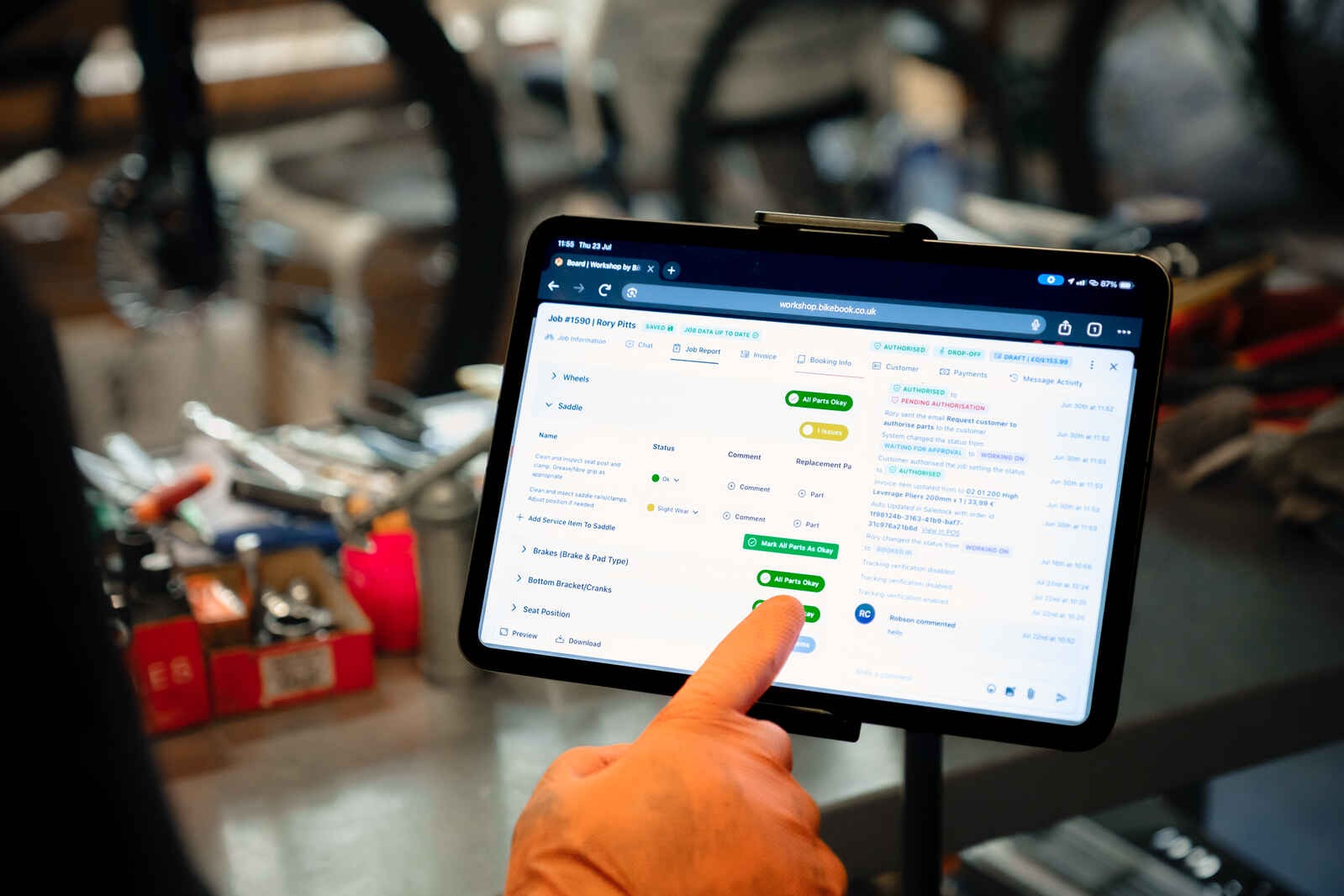
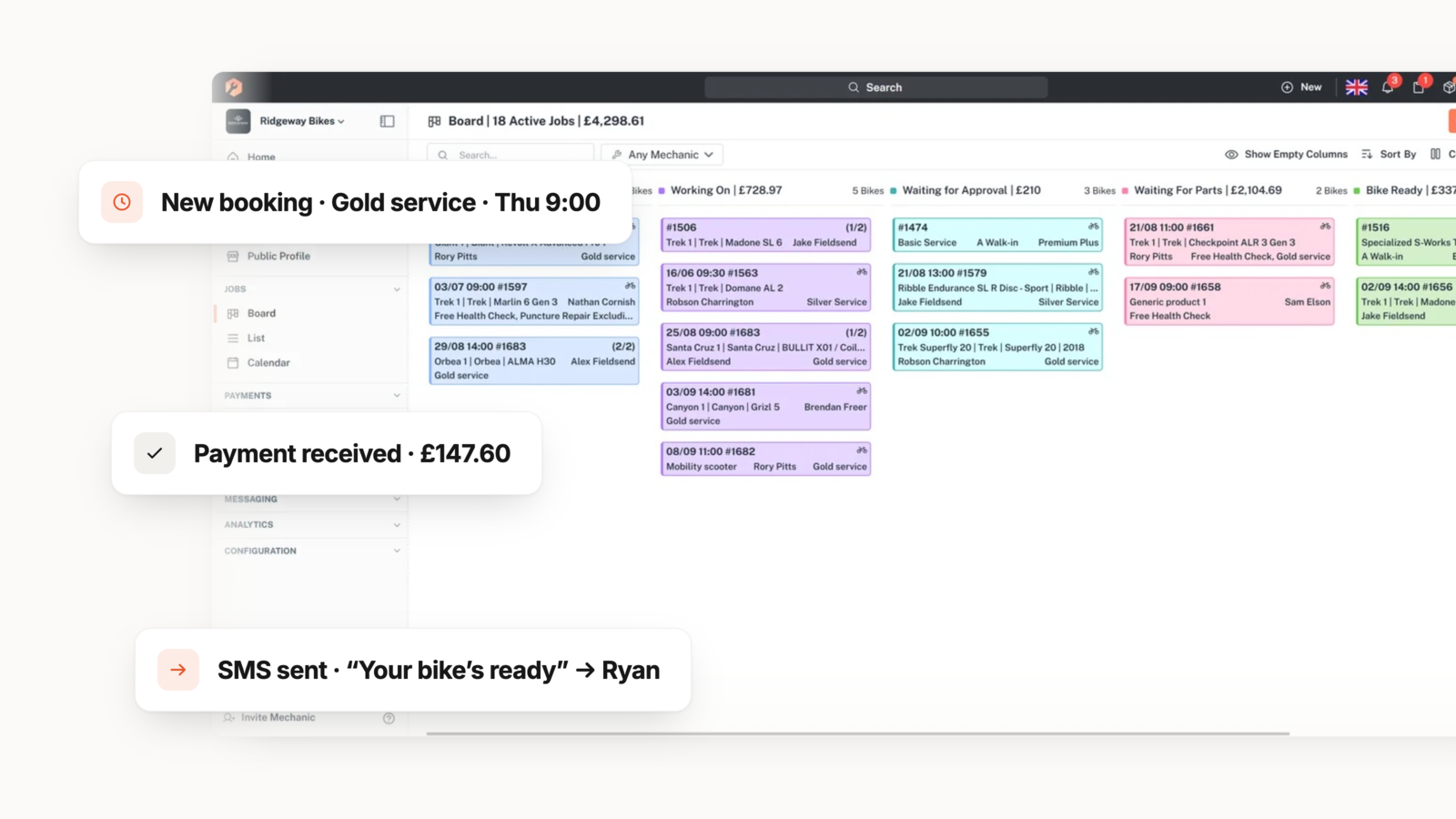
Good integration software does not just share data. It triggers actions automatically. Examples include sending a customer update when a job status changes, adjusting stock when a part is applied to a job card, or generating an invoice when a job is marked complete. Ask which of these automations are built in versus which require manual setup.
Step 5: Review the Migration Path
Switching systems is one of the biggest concerns for busy workshops. Ask about data migration support: can you import existing customer records, bike histories, and stock data? A clear migration path reduces the risk of lost information and shortens the transition period.
What Features Separate Workshop-First Software From Generic POS?
The market includes platforms built for retail that have added a workshop module, and platforms built for the workshop that integrate with retail tools. The difference shows up in daily use.
Digital Job Cards as the Central Record
In a workshop-first platform, the digital job card is the hub. Every piece of information about a repair, including parts used, labour time, customer approvals, photos, and notes, lives on the job card. That record then feeds your invoicing, stock, accounting, and customer history automatically.
In a retail-first system, the service ticket is often a secondary feature. It may lack fields for bike-specific details like frame serial numbers, groupset specifications, or previous service history. Bikebook builds every job card with bike-specific data fields, so your mechanics never start a job without the full picture.
Booking Flow Designed for Service Operations
A workshop booking is not the same as a retail appointment. It needs capacity controls per service type, estimated durations that reflect real workshop time, and the ability to take a deposit at the point of booking. Workshop by Bikebook provides online booking with capacity limits, automated reminders, and deposit collection built into the flow.
Customer Communication Through the Job Lifecycle
Integrated customer messaging means your team does not need to pick up the phone every time a job status changes. Automated SMS and email updates keep customers informed at each stage, from booking confirmation to parts approval to collection readiness. That reduces interruptions for your mechanics and improves the customer experience at the same time.
How Do Integration Needs Differ by Workshop Type?
Your integration priorities depend on how your workshop operates. A standalone workshop, a retailer with a service department, and a mobile mechanic each have different pressure points.
Standalone Workshop
For a workshop that does not sell bikes or accessories at a retail counter, the priority integrations are bookings, job management, payments, accounting, and supplier ordering. You need a tight loop from the job card to the invoice to the bank account, with parts ordering built into the workflow.
Retailer With a Service Department
If you run a retail floor alongside a workshop, POS and ecommerce integrations become critical. Stock needs to sync between the workshop and the retail counter in real time, so parts used on repairs are deducted from your saleable inventory. Bikebook connects workshop operations with POS and ecommerce channels through its retail integration layer.
Mobile Bike Mechanic
Mobile mechanics need their integration software to work from a phone or tablet. Route planning, on-the-go invoicing, and mobile payment acceptance are essential. Workshop by Bikebook includes route planning and mobile access, so mechanics can manage their full workflow without returning to a desk.
Common Mistakes When Choosing Integration Software
Choosing the wrong platform creates years of operational friction. Here are the mistakes that cost workshops the most time and money.
Choosing a System Based on Feature Count Alone
A long feature list looks impressive, but features only matter if they connect to each other. A platform with fifty standalone features and no data flow between them creates more admin than it solves. Prioritise integration depth over feature breadth.
Ignoring the Workshop Workflow
If the software treats service as a secondary use case, your mechanics will fight against it daily. Test the repair workflow specifically: can you track a job from booking through to collection without leaving the platform? If the answer is no, the system was built for a different type of business.
Underestimating the Switching Cost of Doing Nothing
Many workshops delay switching because the migration feels risky. But the cost of staying on disconnected tools compounds every week in duplicated entry, missed bookings, and delayed invoices. According to Workstand's 2026 Bicycle Leadership Conference data, independent bike dealers who invest in connected digital operations report measurably stronger ecommerce growth compared to those relying on manual processes.
What Questions Should You Ask During a Software Demo?
Walking into a demo without a checklist means you will see the features the vendor wants to show, not the ones your workshop needs. Use these questions to steer the conversation.
Ask the vendor to start with a job card, not the dashboard. You want to see how a real repair moves through the system from booking to invoicing. Ask them to order a part from a supplier within the job card, apply it, generate the invoice, and take the payment without switching tools.
Request a demonstration of what happens when a part is not in stock. Does the system create a back order linked to the job? Does the customer get an automatic update? These edge cases reveal the real integration depth.
Finally, ask about ongoing costs. Some platforms charge separately for each integration, which means your monthly bill grows as you connect more tools. Workshop by Bikebook includes its integrations within the subscription, so the price you see at signup is the price you pay as your tool stack grows.
In Conclusion: How to Choose the Right Integration Software for Your Bike Workshop
The right integration software removes the friction between the systems your workshop depends on every day. It connects your bookings, job cards, parts orders, payments, invoicing, and accounting into a single workflow that matches how your team actually works.
Start your evaluation by mapping the tools you use today and identifying where duplicated data entry costs you the most time. Test each vendor against real workshop scenarios, not just demos of the retail checkout. And prioritise platforms that were built for the workshop from the start, not ones that bolted on a service module as an afterthought.
Workshop by Bikebook gives you a platform built by people who understand the cycling trade, with integrations that connect your entire operation from the first booking to the final invoice. If you are ready to see how it works, the 28-day free trial lets you test the full workflow with no card required.
FAQs About Bike Workshop Integration Software
What is bike workshop integration software?
Bike workshop integration software connects your repair management, POS, ecommerce, accounting, and supplier systems into one platform. This eliminates duplicated data entry and keeps stock, payments, and customer records aligned across every tool your workshop uses.
How does Workshop by Bikebook integrate with POS systems?
Workshop by Bikebook connects directly with POS platforms including Shopify, Saledock, and Seanic Retail. When a mechanic completes a job and takes payment, the transaction syncs with your POS records automatically, removing the need for manual reconciliation.
Which supplier integrations does Bikebook offer for bike workshops?
Bikebook connects to over a dozen cycling-specific suppliers, including Madison, ZyroFisher, Silverfish, Extra UK, Chicken CycleKit, and Upgrade Bikes. International suppliers like JBI, HLC, and VeloConnect are also supported, giving workshops access to live stock data and direct ordering from within a job card.
Can integration software help mobile bike mechanics?
Yes. Workshop by Bikebook includes mobile access, route planning, and on-the-go invoicing so mobile mechanics can manage bookings, update job cards, and take payments from their phone. Automated customer updates reduce the time spent on calls while travelling between jobs.
How long does it take to set up bike workshop integration software?
Setup time varies by platform and the number of integrations you need. Workshop by Bikebook is designed for a same-afternoon setup, with guided configuration for services, prices, and statuses. Data migration support is available for workshops moving from existing systems.
Does Bikebook integration software work for multi-location bike shops?
Yes. Workshop Enterprise by Bikebook supports multi-location operations with standardised workflows, role-based permissions, and consolidated reporting across branches. POS, supplier, and accounting integrations extend to every location, keeping data consistent across your entire business.

'%3e%3cg id='Final-Copy-2_2_' transform='translate(1275.000000, 200.000000)'%3e%3cpath class='st0' d='M7.4,12.8h6.8l3.1-11.6H7.4C4.2,1.2,1.6,3.8,1.6,7S4.2,12.8,7.4,12.8z'/%3e%3c/g%3e%3c/g%3e%3c/g%3e%3cg id='final---dec.11-2020'%3e%3cg id='_x30_208-our-toggle' transform='translate(-1275.000000, -200.000000)'%3e%3cg id='Final-Copy-2' transform='translate(1275.000000, 200.000000)'%3e%3cpath class='st1' d='M22.6,0H7.4c-3.9,0-7,3.1-7,7s3.1,7,7,7h15.2c3.9,0,7-3.1,7-7S26.4,0,22.6,0z M1.6,7c0-3.2,2.6-5.8,5.8-5.8 h9.9l-3.1,11.6H7.4C4.2,12.8,1.6,10.2,1.6,7z'/%3e%3cpath id='x' class='st2' d='M24.6,4c0.2,0.2,0.2,0.6,0,0.8l0,0L22.5,7l2.2,2.2c0.2,0.2,0.2,0.6,0,0.8c-0.2,0.2-0.6,0.2-0.8,0 l0,0l-2.2-2.2L19.5,10c-0.2,0.2-0.6,0.2-0.8,0c-0.2-0.2-0.2-0.6,0-0.8l0,0L20.8,7l-2.2-2.2c-0.2-0.2-0.2-0.6,0-0.8 c0.2-0.2,0.6-0.2,0.8,0l0,0l2.2,2.2L23.8,4C24,3.8,24.4,3.8,24.6,4z'/%3e%3cpath id='y' class='st3' d='M12.7,4.1c0.2,0.2,0.3,0.6,0.1,0.8l0,0L8.6,9.8C8.5,9.9,8.4,10,8.3,10c-0.2,0.1-0.5,0.1-0.7-0.1l0,0 L5.4,7.7c-0.2-0.2-0.2-0.6,0-0.8c0.2-0.2,0.6-0.2,0.8,0l0,0L8,8.6l3.8-4.5C12,3.9,12.4,3.9,12.7,4.1z'/%3e%3c/g%3e%3c/g%3e%3c/g%3e%3c/g%3e%3c/svg%3e) Your Privacy Choices
Your Privacy Choices